Android SBC: A Practical Platform for Modern Embedded Products
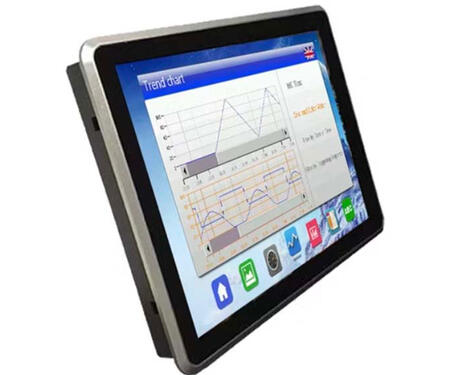
An Android SBC, or Android single-board computer, is a compact embedded computing board designed to run the Android operating system. It usually integrates an ARM-based processor, memory, storage, power management, display output, touch interface, USB, Ethernet, Wi-Fi, Bluetooth, GPIO, UART, and other expansion interfaces on one board. For many modern embedded products, an Android SBC provides a practical balance between hardware integration, user interface capability, software flexibility, and development efficiency.In traditional embedded products, many control panels were built with microcontrollers and simple displays. This approach is still useful for low-cost devices with limited functions. However, modern products often need a better user experience. Users expect smooth touch response, clear icons, multiple languages, network setup pages, audio prompts, video playback, cloud connection, and remote updates. These requirements are difficult to implement on a basic microcontroller platform, but they are much easier to support with Android.One of the biggest advantages of an Android SBC is the graphical user interface. Android was originally designed for touch-based devices, so it provides a mature framework for building interactive applications. Developers can create menus, dashboards, settings pages, charts, login screens, media windows, and notification systems using familiar Android development tools. This makes Android SBCs suitable for industrial HMI panels, smart home control terminals, medical devices, retail kiosks, EV chargers, access control systems, and IoT gateways.A typical Android SBC is based on an ARM SoC. The processor may include CPU cores, GPU, video processing units, display controllers, memory interfaces, and many peripheral functions. The CPU handles application logic, system services, communication tasks, and data processing. The GPU helps render the user interface smoothly, especially when the product uses high-resolution displays or animations. RAM and eMMC storage are also important because Android requires more system resources than a lightweight embedded Linux system.Display integration is a key part of Android SBC development. Many products use TFT LCD modules with capacitive touch panels. Depending on the board design, the display may connect through MIPI DSI, LVDS, RGB, HDMI, or eDP. The board must support the correct resolution, timing, backlight control, power sequence, and touch controller. If the display and touch panel are not properly integrated, the final product may suffer from wrong orientation, unstable touch response, poor brightness control, or boot-time display issues.Software support is just as important as hardware. A good Android SBC should come with a stable BSP, including bootloader, Linux kernel, Android framework adaptation, device tree, hardware drivers, firmware tools, and flashing utilities. For production products, engineers often need to customize the boot logo, hide the navigation bar, disable unnecessary system apps, start the main application automatically, enable kiosk mode, and restrict user access to system settings. These changes make the device behave like a dedicated product instead of a normal consumer tablet.Android SBCs are also useful because they support many connectivity options. Ethernet and Wi-Fi can connect the device to local networks or cloud services. Bluetooth can be used for local setup, pairing, or accessory connection. USB can support cameras, barcode scanners, storage devices, keyboards, or maintenance tools. UART, GPIO, RS485, CAN, I2C, and SPI can connect the Android system with external controllers, sensors, relays, or industrial modules. This makes the Android SBC a flexible bridge between the user interface and the physical device.In industrial and commercial products, reliability must be considered carefully. An Android SBC may need to run continuously for months or years. Developers should test application stability, memory usage, storage writes, network reconnection, power cycling, thermal behavior, and OTA update recovery. A product that works well during a short demonstration may still fail in the field if logs fill the storage, Wi-Fi does not reconnect, the application leaks memory, or the system overheats inside a sealed enclosure.Thermal design is another important factor. Android SBCs often drive displays, touch panels, wireless modules, audio, and background services at the same time. If the product is installed in a wall box, industrial cabinet, or compact enclosure, heat may accumulate. Engineers should evaluate processor load, backlight power, enclosure material, PCB layout, and heat spreading. A stable product should be tested under real operating conditions, not only on an open desk.Compared with Linux SBCs, Android SBCs are usually better when the product needs a rich touch interface, multimedia features, app-style development, and frequent UI updates. Linux SBCs may be better for lightweight control systems, faster boot, direct hardware access, and minimal software stacks. The best choice depends on the product requirement and the software team’s experience.When selecting an Android SBC, engineers should consider CPU performance, RAM size, eMMC capacity, Android version, BSP quality, display support, touch compatibility, I/O interfaces, wireless performance, power input, operating temperature, mechanical size, long-term supply, and vendor support. The cheapest board is not always the best choice. A board with stable software support, reliable hardware design, and good documentation can save much more time during product development.In conclusion, an Android SBC is a strong platform for modern embedded products that require a graphical interface, touch operation, network connectivity, multimedia support, and flexible software updates. It allows product teams to build professional HMI systems, smart terminals, and connected devices with less low-level development work. When the hardware, display, touch panel, software, enclosure, and production process are planned together, an Android SBC can become a reliable foundation for a successful embedded product.